
Java Explained Simply: Why It Runs Everywhere (and How)
Why Java was created, how "Write Once, Run Anywhere" really works, and what every developer should know before writing their first "Hello, World!"
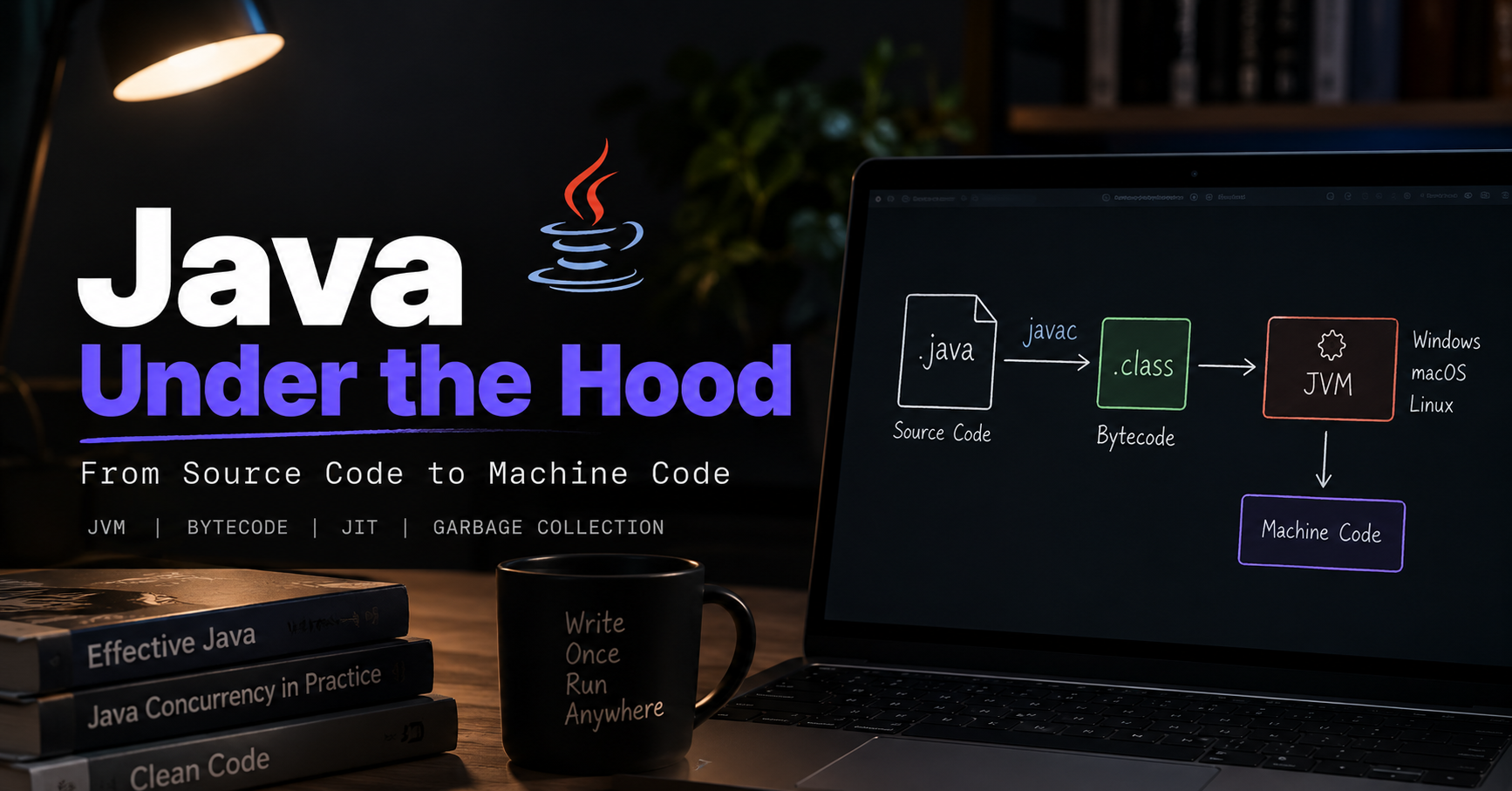
You're about to type System.out.println("Hello, World!");.
Wait.
Java has powered banks, e-commerce backends, Android tooling and big-data platforms for almost three decades. The reason isn't its syntax. It's the machinery running underneath your code, and understanding it is what separates people who copy-paste Java from people who actually think in it.
Spend ten minutes here and every Java concept you meet later (memory, threads, performance, deployment) will have somewhere to land.
In this article you'll learn:
The problem Java was built to solve, and the idea behind "Write Once, Run Anywhere"
How bytecode, the JVM, the JIT compiler and the garbage collector fit together
The difference between JDK, JRE and JVM (and why nearly everyone gets this wrong at first)
A short, accurate history of Java, plus which version you should install today
A hands-on way to see bytecode yourself in 60 seconds
The problem Java was born to solve
Before Java, C and its extension C++ dominated systems and application development. They're fast and powerful, but they come with a big catch: the binary you produce is tied to the platform you compiled it on.
Quick vocabulary:
Source code: the human-readable code you write.
Compiler: a program that translates source code into machine code, the binary instructions a specific CPU and operating system understand.
Machine code for Windows is different from machine code for macOS or Linux. To ship one C/C++ program to three platforms, you had to compile it three times, and you often had to modify the code for each one.
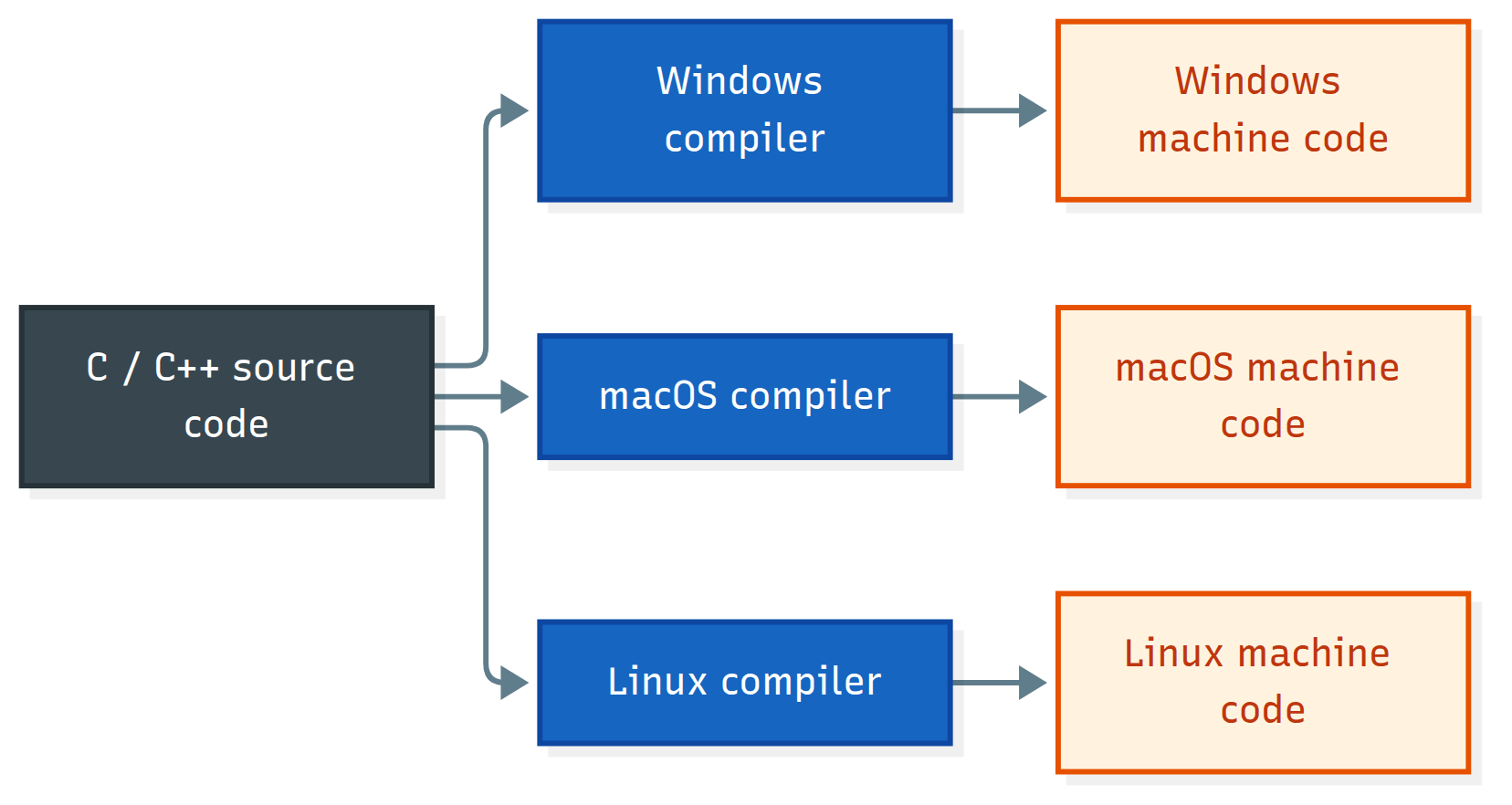
Developers needed a better way.
Java's big idea: Write Once, Run Anywhere (WORA)
Java's answer was a slogan: Write Once, Run Anywhere.
Instead of compiling straight to machine code, Java compiles your source into bytecode, a compact, platform-neutral instruction set. A program called the JVM (Java Virtual Machine) then executes that bytecode on whatever system it happens to be running on.
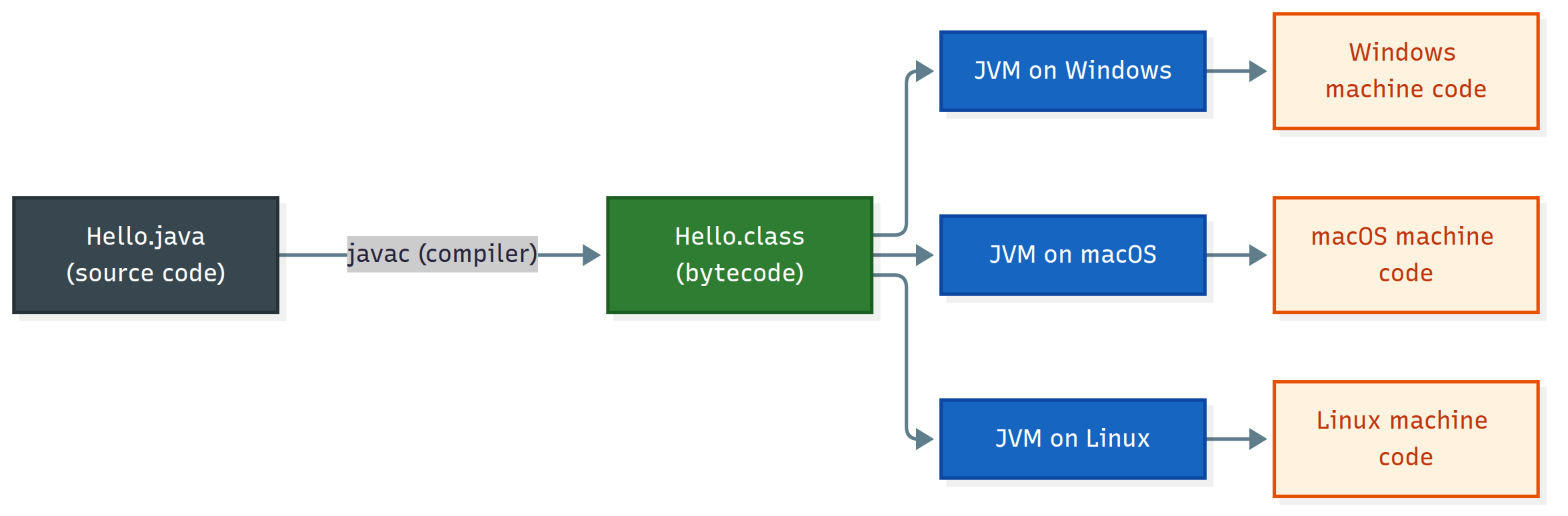
The only requirement: the target machine needs a JVM.
💡 Remember this: Java bytecode is platform-independent. The JVM is platform-specific. That split is the whole trick.
One more detail that separates juniors from seniors: the JVM is a specification, not a single product. Multiple implementations exist (HotSpot, which ships with most JDKs, plus others like Eclipse OpenJ9 and GraalVM). Any of them can run your .class files, as long as they follow the spec.
The three pillars: portability, simplicity, security
🌍 Portability. Compile once to bytecode, then run it on any OS or CPU architecture that has a JVM.
🧩 Simplicity. Java deliberately dropped the C++ features that made large codebases hard to learn and maintain: pointer arithmetic, manual memory management, operator overloading, multiple inheritance of classes, header files and the preprocessor.
🔒 Security. Your code never touches raw memory. It runs through the JVM, which:
Verifies bytecode before running it, rejecting malformed or malicious class files
Loads classes through controlled class loaders
Enforces runtime checks such as array bounds and null checks
Encapsulates internals through the module system (Java 9+)
⚠️ A note on "sandboxing": Older tutorials describe the JVM as a secure sandbox for running untrusted code (think applets). That model relied on the
SecurityManager, which was deprecated for removal in Java 17 and permanently disabled in Java 24. Today, Java's security story is memory safety plus verification. If you must run untrusted code, isolate it at the OS or container level.
A quick history of Java
Java is a high-level, class-based, object-oriented, platform-independent programming language created by James Gosling and his team at Sun Microsystems.
It began in 1991 as the Green project and a language called Oak, aimed at interactive TV and small devices. That market never took off, but the explosion of the web in the mid-90s gave the language a second life. It was renamed Java (reportedly after coffee ☕) and announced publicly in 1995.
From source code to execution: the Java journey
Here's what happens when you build and run a Java program:
javac Hello.java   # compiles source code into Hello.class (bytecode)
java Hello         # starts the JVM, which loads and runs it
And here's what lives inside the JVM:
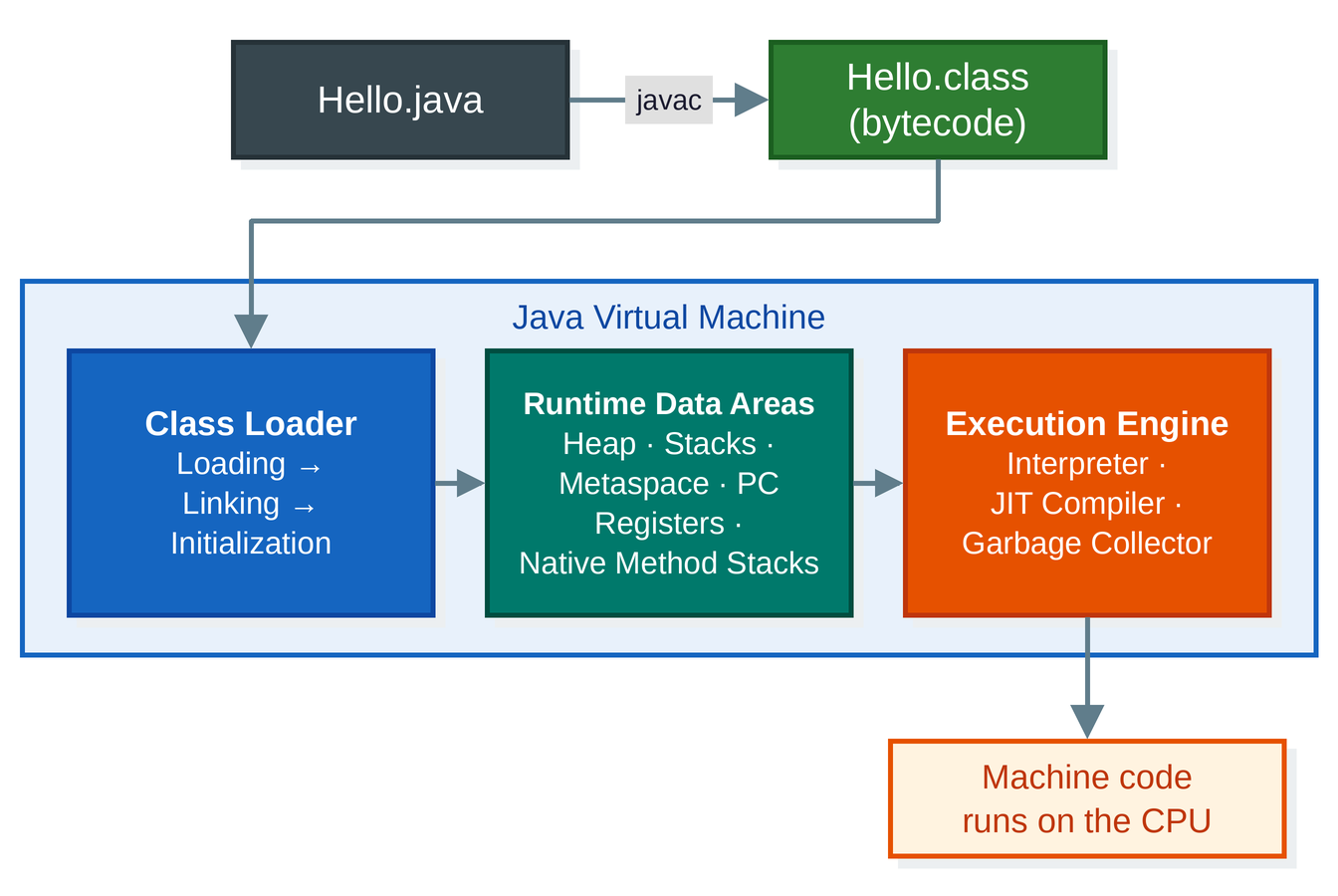
Let's break it down.
1. Class Loader
Finds and loads .class files, then prepares them for execution in three phases:
Loading: read the bytecode into the JVM
Linking: verify the bytecode is valid and safe, prepare memory for static fields, and resolve symbolic references
Initialization: run static initializers
Java uses a hierarchy of class loaders (bootstrap, platform and application), which is part of how the JVM keeps core classes trustworthy.
2. Runtime Data Areas
The JVM's memory layout. It's a lot of jargon at first, so here's the one-line version of each:
| Area | What lives there | Shared across threads? |
|---|---|---|
| Heap | All objects and arrays (managed by the garbage collector) | Yes |
| Metaspace | Class metadata and method data | Yes |
| Stack | One per thread: method calls, local variables | No |
| PC Register | One per thread: the current bytecode instruction | No |
| Native Method Stack | One per thread: calls into native (non-Java) code | No |
We'll unpack each one in a dedicated upcoming article.
3. Execution Engine
The part that actually runs your program:
Interpreter: executes bytecode instruction by instruction, so programs start quickly.
JIT (Just-In-Time) compiler: watches which methods and loops run often ("hot spots") and compiles them into optimized native machine code, so programs run fast. HotSpot uses tiered compilation: the C1 compiler optimizes quickly, and the C2 compiler optimizes aggressively for the hottest code.
Garbage Collector (GC): automatically reclaims memory from objects your program can no longer reach. Modern JVMs ship several collectors (G1 is the default; ZGC and others target low latency).
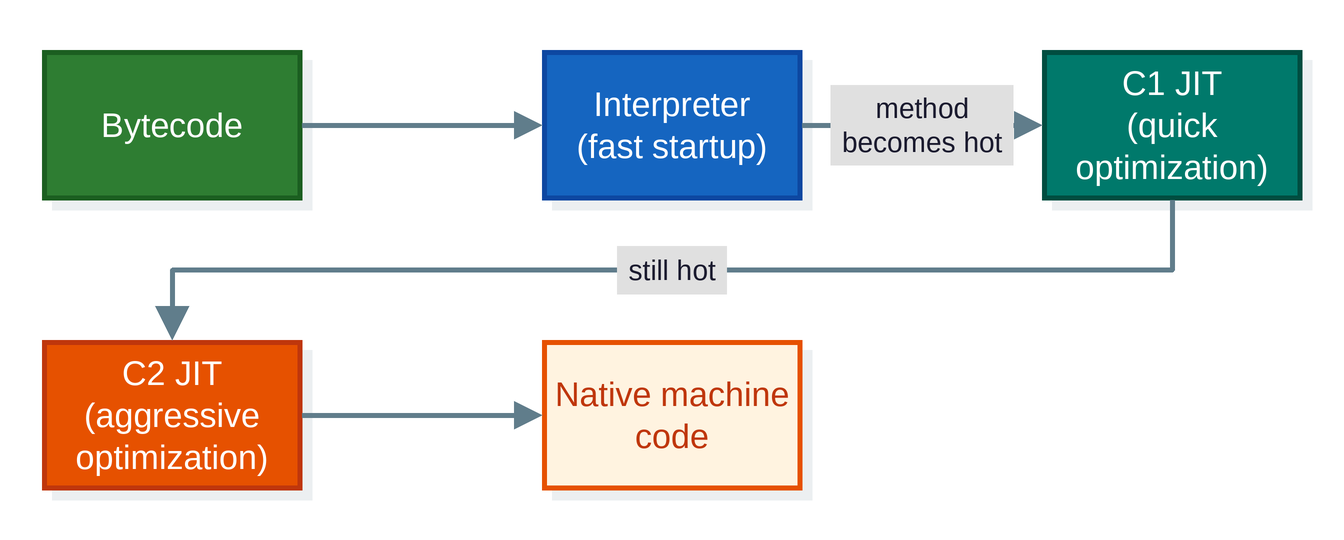
❓ Is Java a compiled or an interpreted language?
Every Java developer should be able to answer this one. Look at the diagrams above, then drop your answer in the comments before you read mine. 😉
My answer: both. javac compiles source to bytecode. The JVM then interprets that bytecode and JIT-compiles the hot parts to machine code at runtime. Java is a compiled language with an interpreted-plus-JIT execution model, and that's exactly why it's both portable and fast.
What the JVM does for you
Bytecode execution: runs the same
.classfiles on any platform.Security: bytecode verification, class loader checks and runtime checks.
Automatic memory management: no manual
malloc/freeas in C and C++, which removes whole classes of bugs (dangling pointers, double frees, buffer overruns). Memory leaks are still possible, for example when you keep references to objects you no longer need.Performance optimization: the interpreter plus the JIT compiler give Java performance that is competitive with natively compiled languages in many workloads.
JDK vs JRE vs JVM
Three acronyms confuse every beginner. The trick is to remember they're nested: the JDK contains the JRE, and the JRE contains the JVM.
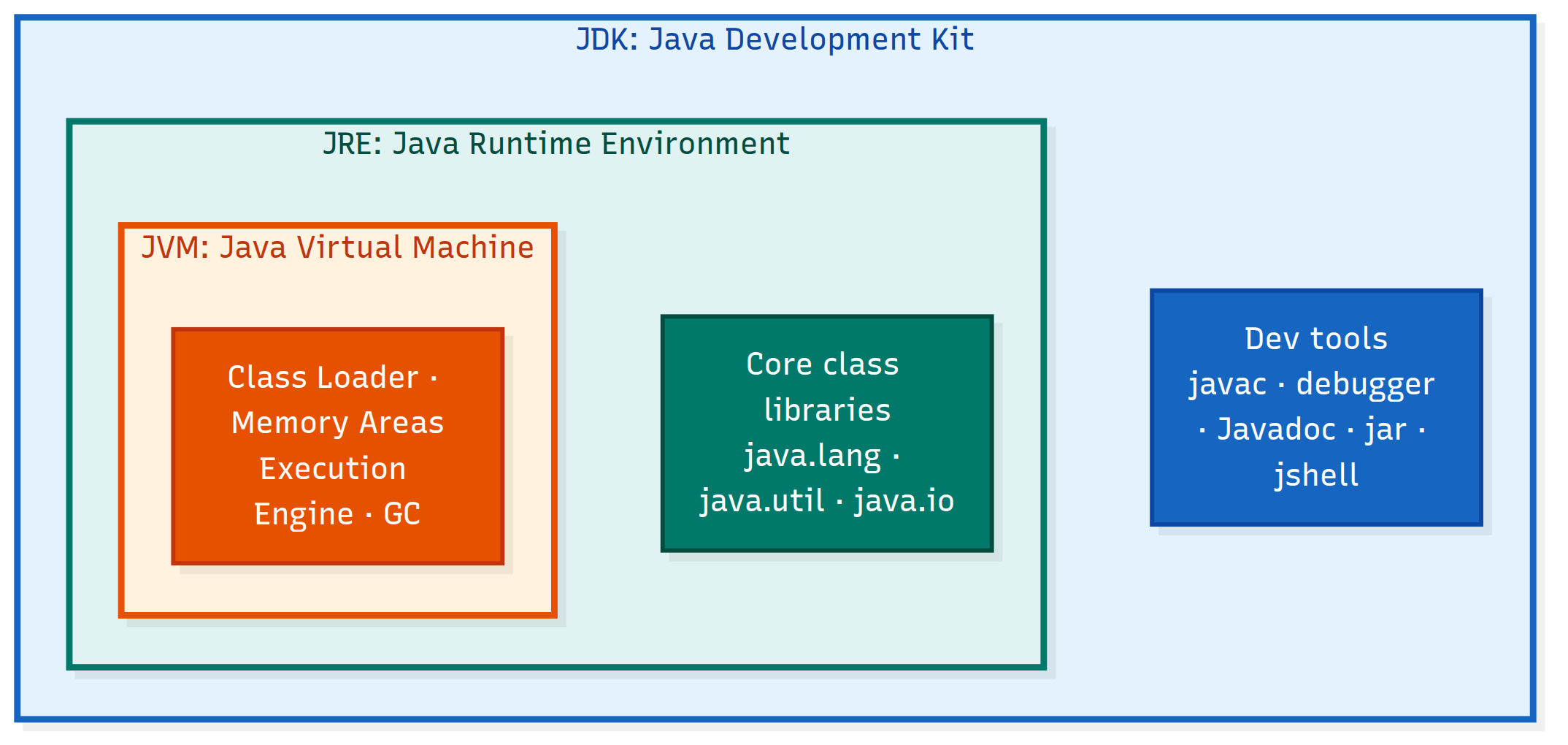
| Term | What it is | Who needs it |
|---|---|---|
| JVM | Executes bytecode | Everyone (it's included in the others) |
| JRE | JVM + core class libraries (the built-in classes and methods, like System.out.println) |
Anyone who only runs Java apps |
| JDK | JRE + development tools | Anyone who writes Java code |
What's in the JDK's toolbox?
javac: the compiler that turns.javafiles into bytecode.A debugger: helps you find bugs by pausing your program, inspecting variables and stepping through code line by line. The JDK ships
jdb, and every major IDE builds a graphical debugger on the same underlying platform.Javadoc: a built-in documentation generator that turns special
/** ... */comments in your source code into professional HTML API documentation.Other tools:
jar(packaging),jshell(an interactive REPL),jlink(build custom runtimes),jcmdandjconsole(diagnostics and monitoring).
Modern reality check: Since Java 11, Oracle no longer ships a separate JRE download. You install a JDK and get everything. If you need a slim runtime for deployment,
jlinkcan build a custom one containing only the modules your app uses.
🔬 Try it yourself: see bytecode in 60 seconds
Reading about bytecode is one thing. Looking at it is better. Create a file named Hello.java:
public class Hello {
    public static void main(String[] args) {
        System.out.println("Hello, World!");
    }
}
Compile it, then look inside the .class file:
javac Hello.java
javap -c Hello
You'll see output similar to this (constant-pool numbers may differ slightly on your machine):
public static void main(java.lang.String[]);
  Code:
     0: getstatic     #7    // Field java/lang/System.out:Ljava/io/PrintStream;
     3: ldc           #13   // String Hello, World!
     5: invokevirtual #15   // Method java/io/PrintStream.println:(Ljava/lang/String;)V
     8: return
That's your program as the JVM sees it: load System.out, push the string, call println, return. Want a party trick? Every valid class file starts with the same four "magic" bytes:
xxd Hello.class | head -n 1
# 00000000: cafe babe 0000 0045 ...
Yes, those bytes spell CAFEBABE (another coffee reference). The next bytes hold the class file version, which is how the JVM knows what Java version produced the file.
💡 Shortcut: Since Java 11, you can run a single source file directly with
java Hello.java. It compiles in memory and runs immediately. Great for quick experiments.
Which Java version should you install?
As of October 2026:
Java 25 is the current LTS release and a great default for new projects and learning.
Java 21 is the previous LTS and is still widely deployed.
Java 27 is the newest feature release, but it's non-LTS, so it's best for experimenting rather than long-lived production systems.
Pick a JDK distribution from a vendor you trust, such as Eclipse Temurin, Amazon Corretto, Microsoft Build of OpenJDK or Oracle JDK. For learning, they're all fine. Check each vendor's license and support terms before using one in production. Version support windows change, so verify against the vendor's site.
Java editions (you can skip this one)
| Edition | Purpose | Used for |
|---|---|---|
| Java SE (Standard Edition) | Core language and libraries | Learning Java, desktop apps, backend development |
| Jakarta EE (formerly Java EE, Enterprise Edition) | Enterprise APIs on top of Java SE | Large enterprise and web applications. Frameworks like Spring Boot build on Java SE and use several Jakarta EE specifications |
| Java ME (Micro Edition) | Lightweight Java for small, constrained devices | Mostly legacy today (old feature phones, some embedded devices) |
As a beginner, Java SE is all you need.
Key takeaways
Java compiles to bytecode, not directly to machine code.
The JVM executes bytecode on each platform, which is what makes "Write Once, Run Anywhere" possible.
JDK ⊃ JRE ⊃ JVM: develop with the JDK, run with the JRE, execute on the JVM.
Java is both compiled and interpreted:
javaccompiles, then the JVM interprets and JIT-compiles.The JVM gives you security checks, garbage collection and JIT optimization out of the box.
Java was created by James Gosling at Sun Microsystems, announced in 1995, and is now stewarded by Oracle together with the OpenJDK community.
FAQ
Who created Java? James Gosling and his team at Sun Microsystems.
What does WORA mean? "Write Once, Run Anywhere": compile your code once to bytecode, then run it on any platform that has a JVM.
Is Java platform-independent? Java bytecode is. The JVM that runs it is platform-specific.
What's the difference between JDK, JRE and JVM? The JVM runs bytecode. The JRE adds the core class libraries. The JDK adds development tools like javac and Javadoc on top of the JRE.
Do I need to install the JRE if I have the JDK? No. The JDK already includes everything needed to run Java programs.
Is Java a compiled or interpreted language? Both. Source code is compiled to bytecode, which the JVM interprets and JIT-compiles at runtime.
Does Java have garbage collection? Yes. The JVM automatically reclaims memory from unreachable objects, so you don't free memory manually.
What's next?
Now that you know how Java works under the hood, you're ready to install the JDK and write your first real program. In the next article, we'll go deeper into JVM memory and the interpreter vs. JIT story.
Did this help? Leave a comment with your answer to the compiled-vs-interpreted question, and hit that ❤️ so more beginners can find it!